






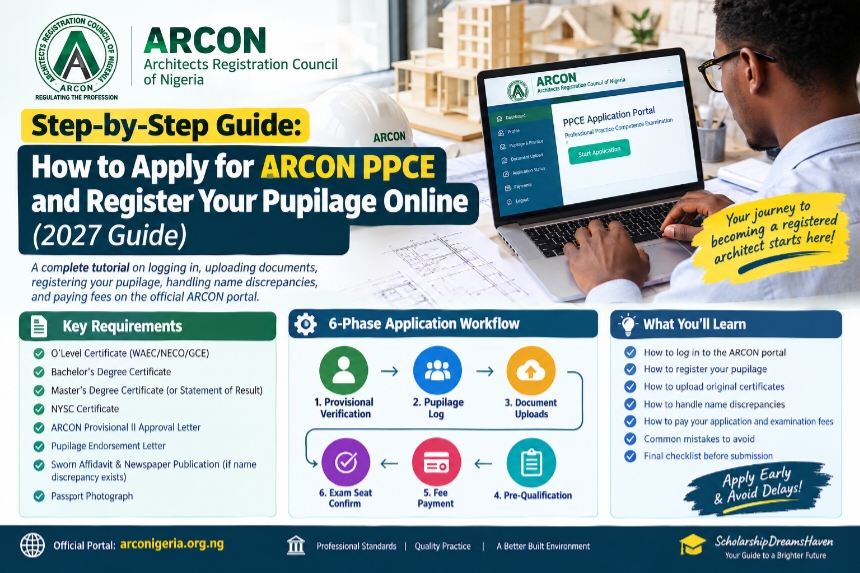
Preparing for the Architects Registration Council of Nigeria (ARCON) Professional Practice Competence Examination (PPCE) involves more than studying for the examination itself. Candidates must satisfy the applicable professional-experience requirements, maintain the appropriate registration status, submit supporting credentials and complete the pre-qualification process within the announced application window.
- 1. Understand the PPCE Eligibility Requirements
- 2. Prepare Your Document Folder
- 3. Understand the Two-Year Pupilage Requirement
- 4. Make Sure Your Supervising Architect Qualifies
- 5. Access the Official PPCE Application Platform
- 6. Review Your Professional Profile
- 7. Enter Your Pupilage and Professional Experience
- 8. Maintain Your Pupilage Logbook
- 9. Upload Your Academic Credentials
- 10. Handle Name Discrepancies Properly
- 11. Review the Application Before Submission
- 12. Pay Only the Fees Displayed for the Current PPCE Diet
- 13. Complete Pre-Qualification
- 14. Download and Keep Your Examination Documents
- 15. Common Mistakes That Can Create PPCE Application Problems
- 16. 2027 PPCE Pre-Submission Checklist
- Final Thoughts
For architecture graduates planning to take a 2027 PPCE diet, starting the administrative process early can help you identify problems with your qualifications, pupilage records, supporting documents or professional registration before the application deadline.
ARCON’s current pathway identifies PPCE as a stage toward full professional registration, with a two-year pupilage requirement from the date the Master’s degree was obtained. Recent official PPCE notices have also required candidates to be appropriately registered and actively involved in architectural practice under the supervision of a suitably registered and financially compliant architect.
This guide explains the key requirements to prepare for, how the pupilage and application process works, what documents may be requested, and the mistakes that can create problems during pre-qualification.



Important: The 2027 PPCE application dates, fees, portal instructions and exact documentary requirements should be confirmed from the official ARCON/NIA notice for the relevant examination diet. Requirements and charges can change from one examination cycle to another.
1. Understand the PPCE Eligibility Requirements
Before beginning an application, make sure you understand the professional pathway.
ARCON’s current registration pathway identifies Provisional I, Provisional II, PPCE and Full Registration as stages in the professional registration process. ARCON states that candidates proceeding to PPCE must complete the required two-year pupilage from the date their Master’s degree was obtained.



Recent PPCE notices have also specified requirements concerning supervised post-graduation practice, ARCON provisional registration and active professional practice under an appropriately registered architect. The exact conditions should always be checked against the notice for your examination diet.
What This Means for Applicants
Depending on your circumstances, you may need to have:
- An accredited architectural qualification.
- The appropriate postgraduate qualification for the applicable registration pathway.
- ARCON Provisional II registration where required.
- The required period of supervised professional practice.
- An eligible supervising architect.
- Appropriate Nigerian Institute of Architects (NIA) membership where required by the current PPCE notice.
- Properly documented professional experience.
- Required academic and NYSC credentials.
Do not rely on another candidate’s eligibility status as evidence that you automatically qualify. Your academic background, registration history and professional experience must satisfy the requirements applicable to your examination cycle.
2. Prepare Your Document Folder
Before beginning the online application, create a dedicated folder containing clear digital copies of your important documents.
Related Articles



The exact upload requirements can vary, so follow the specifications shown on the official application portal.
Documents You May Need
Depending on your category and application history, prepare documents such as:
- O’Level certificate or acceptable equivalent.
- Bachelor’s degree certificate.
- Master’s degree certificate or acceptable evidence of the qualification.
- NYSC Discharge Certificate, Exemption Certificate or applicable documentation.
- ARCON provisional registration documentation.
- NIA membership documentation where applicable.
- Professional experience or pupilage records.
- Logbook or other practice records required for the relevant examination.
- Supervising architect information or supporting documentation.
- Passport photograph.
- Evidence of change of name where applicable.
- Academic transcript where specifically required.
- Other documents requested in the official PPCE notice.
NIA’s published membership requirements also list O’Level credentials, B.Sc./M.Sc. certificates, NYSC documentation, transcripts for foreign graduates, evidence of change of name and work-experience information among relevant professional membership documentation.
Keep Original Documents Available
Do not assume that uploading a scanned copy means the original will never be required.
Professional registration processes may require original credentials to be produced for verification. NIA’s published membership guidelines, for example, state that credentials may need to be endorsed after the originals have been sighted and that original certificates can be requested.
3. Understand the Two-Year Pupilage Requirement
One of the most important issues for prospective PPCE candidates is the calculation of professional experience.
ARCON’s current website states that candidates proceeding to PPCE must complete two years of pupilage from the date the Master’s degree was obtained.
This means candidates should not casually calculate their PPCE experience from the date they completed their Bachelor’s degree.
Keep Accurate Records
Your professional-experience records should clearly establish:
- When your qualifying postgraduate degree was obtained.
- When your supervised practice began.
- Where you worked.
- Who supervised your professional practice.
- The projects and responsibilities you handled.
- The relevant period covered by your professional records.
Recent ARCON PPCE guidance has also referred to a minimum period of supervised post-graduation practice and specified conditions concerning the supervising architect.
Because the wording and qualifying dates can vary by examination notice, always calculate your eligibility against the official notice for the particular PPCE diet.
4. Make Sure Your Supervising Architect Qualifies
Your supervising architect is an important part of the pupilage process.
Recent official PPCE requirements state that prospective candidates must be involved in architectural practice under the supervision of an architect who is fully registered and financially compliant with ARCON, is a financial member of the NIA and has the required post-registration experience.
Before Listing a Supervisor, Confirm:
- The architect is properly registered with ARCON.
- The architect’s professional status is current.
- The architect meets the applicable experience requirement.
- The architect is financially compliant where required.
- The architect is permitted to supervise the relevant professional experience.
- Your employment and supervision records accurately reflect the arrangement.
ARCON provides a public facility for checking the status of architects and firms by registration number.
If you are uncertain about a supervisor’s status, verify it before relying on the experience for your PPCE application.
5. Access the Official PPCE Application Platform
When the 2027 application window opens, begin from the official ARCON or NIA announcement for that examination diet.
Do not rely on an old registration URL copied from a blog, WhatsApp group or social-media post.
Recent PPCE information has been jointly associated with ARCON and NIA, and the official 2026 notices directed prospective candidates to the applicable application process and requirements.
Before Logging In
Have the following information nearby:
- ARCON registration details.
- NIA membership information where applicable.
- Email address.
- Telephone number.
- Academic qualifications.
- Postgraduate qualification details.
- Pupilage information.
- Supervising architect details.
- Digital copies of supporting documents.
- Payment method.
6. Review Your Professional Profile
Once you access the relevant application platform, carefully review the information associated with your professional profile.
Check:
- Full name.
- Date of birth.
- Email address.
- Phone number.
- Residential/contact information.
- Academic qualifications.
- ARCON registration details.
- NIA membership details where applicable.
- Professional experience.
Correct discrepancies before submitting the application whenever the portal provides a correction facility.
Avoid Creating Duplicate Professional Profiles
If you already have an ARCON or NIA account, do not create a second account simply because you cannot remember your login details.
NIA’s current membership portal specifically warns existing members not to register again and instead directs them to contact the Secretariat if they cannot access or remember their existing membership profile.
7. Enter Your Pupilage and Professional Experience
Complete the section relating to your supervised professional practice using accurate information.
You may need to provide details such as:
- Employer or architectural practice.
- Practice address.
- Supervising architect.
- Registration information.
- Start and end dates.
- Nature of professional work.
- Projects handled.
- Professional responsibilities.
- Logbook or practice records.
Do Not Inflate Your Experience
Only report professional experience that you can substantiate.
If your dates, employer information or supervising architect details cannot be verified, the application may require clarification or additional documentation.
Professional experience should be documented consistently across your CV, logbook, employment records and application.
8. Maintain Your Pupilage Logbook
Keep your professional records throughout the entire pupilage period rather than trying to reconstruct everything shortly before the examination.
Your records should accurately reflect the work you performed and the supervision you received.
Depending on the current PPCE requirements, professional-experience documentation may include a logbook or other records of supervised practice.
Historical NIA examination documentation has also treated an acceptable professional-practice logbook and supporting information from the supervising architect as important components of professional examination admission.
Good Logbook Practice
Record information such as:
- Project name.
- Project location.
- Project type.
- Your role.
- Tasks performed.
- Design stages involved.
- Site activities.
- Approval-related activities.
- Documentation produced.
- Dates of relevant activities.
- Supervising architect’s confirmation where required.
Do not wait until the end of your pupilage to reconstruct two years of professional activities from memory.
9. Upload Your Academic Credentials
Upload the documents requested by the current PPCE application instructions.
These may include:
- O’Level credentials.
- Bachelor’s degree certificate.
- Master’s degree certificate.
- NYSC documentation.
- ARCON registration documents.
- NIA membership evidence where applicable.
- Other supporting credentials.
What If Your Master’s Certificate Is Not Available?
Do not automatically assume that a statement of result will be accepted.
The acceptable alternative depends on the current application instructions and your circumstances.
If you have only a statement of result, check the relevant PPCE notice or contact the responsible ARCON/NIA office before submitting the application.
This is particularly important because older examination procedures have not always treated statements of result and formal certificates in the same way.
10. Handle Name Discrepancies Properly
Name differences across academic and professional documents are common, but they should not simply be ignored.
For example, your documents might show:
- ADEBAYO Oluwaseun John
- Oluwaseun John ADEBAYO
- John Oluwaseun ADEBAYO
A difference in the order of names is not necessarily the same as a legal change of name.
If Your Name Has Legally Changed
Prepare the appropriate supporting documentation, such as an affidavit or other evidence specifically required by the relevant authority.
NIA’s published membership requirements expressly include evidence of change of name where applicable.
Do not create or alter certificates yourself to make the names match.
If you are unsure whether your particular discrepancy requires an affidavit, deed poll, newspaper publication or another document, confirm the requirement with the relevant office before submission.
11. Review the Application Before Submission
Before clicking the final submission button, go through the application carefully.
Check:
Personal Information
- Full name.
- Date of birth.
- Email.
- Phone number.
- Contact address.
Academic Information
- Institution names.
- Qualification titles.
- Graduation dates.
- Master’s degree information.
- NYSC details.
Professional Information
- Supervising architect.
- Practice details.
- Pupilage dates.
- Professional experience.
- Logbook information.
Uploaded Documents
- Correct file attached to each field.
- Documents are readable.
- No page is missing.
- Names and dates are visible.
- Supporting documents are included where required.
Payment
- Correct fee displayed.
- Correct payment category selected.
- Payment reference saved.
- Receipt saved after successful payment.
12. Pay Only the Fees Displayed for the Current PPCE Diet
Avoid publishing or relying on fixed PPCE fees from an old examination cycle.
The application fee, examination fee, seminar fee and other charges may be revised.
For example, a fee quoted for a previous PPCE cannot automatically be presented as the 2027 fee.
Before Paying
Confirm:
- The payment is being made through the official application process.
- The amount displayed corresponds to the current PPCE diet.
- The payment reference is associated with your application.
- You receive and save evidence of payment.
Keep your receipt and payment reference until the entire registration and examination process is completed.
13. Complete Pre-Qualification
Submitting an application does not necessarily mean that you have been cleared to sit for the examination.
The relevant authorities may review:
- Academic qualifications.
- Professional registration.
- Pupilage.
- Supervising architect.
- Professional experience.
- Membership status.
- Supporting documents.
- Other eligibility requirements.
Recent PPCE notices have described a pre-qualification process and specified eligibility conditions that candidates must satisfy before proceeding to the examination.
Monitor Your Application
Regularly check:
- Your registered email address.
- Your application dashboard.
- Official ARCON notices.
- Official NIA announcements.
If your application is marked incomplete or you are asked for additional documentation, respond through the official channel.
14. Download and Keep Your Examination Documents
Once you have been cleared and have completed the required examination registration, save every important document associated with your application.
Create a folder containing:
- Application confirmation.
- Payment receipts.
- Candidate/reference number.
- Pre-qualification confirmation.
- Examination registration confirmation.
- Examination docket or photocard where issued.
- Seminar information.
- Examination timetable.
- Correspondence from ARCON/NIA.
Save both a digital copy and, where practical, a printed copy.
15. Common Mistakes That Can Create PPCE Application Problems
1. Counting Experience From the Wrong Date
ARCON’s current pathway states that the two-year pupilage period is calculated from the date the Master’s degree was obtained.
Do not automatically count your pupilage from your Bachelor’s graduation date.
2. Using an Unqualified or Financially Non-Compliant Supervisor
Recent PPCE guidance requires candidates to practise under appropriately registered and financially compliant professional supervision.
Verify the supervisor’s status before submitting the application.
3. Uploading Unclear Documents
Blurry scans, cropped pages and unreadable certificates can create unnecessary verification problems.
Use clear documents that satisfy the specifications shown on the current portal.
4. Assuming Old Fees Still Apply
A fee from a previous examination cycle may no longer be valid.
Always use the amount displayed in the official current application process.
5. Waiting Until the Final Days
If your application reveals a problem with your registration, supervisor, qualification or supporting documentation, you may need time to resolve it.
Starting early is particularly important when professional verification is involved.
6. Relying on Unofficial Application Links
Do not send credentials or payment to an individual simply because they claim to be helping candidates register.
Start from official ARCON or NIA announcements.
16. 2027 PPCE Pre-Submission Checklist
Before submitting your application, review this checklist:
Eligibility
- [ ] I have reviewed the current 2027 PPCE eligibility notice.
- [ ] My Master’s qualification satisfies the applicable requirement.
- [ ] I have completed the required period of supervised professional practice.
- [ ] My ARCON registration status is appropriate.
- [ ] My NIA membership status satisfies the current requirement, where applicable.
Supervising Architect
- [ ] My supervising architect is properly registered.
- [ ] The architect meets the applicable experience requirement.
- [ ] The architect’s financial/practice status is current where required.
- [ ] My supervision dates are accurate.
Documents
- [ ] O’Level credentials prepared.
- [ ] Bachelor’s degree certificate prepared.
- [ ] Master’s degree certificate or accepted supporting document prepared.
- [ ] NYSC documentation prepared.
- [ ] ARCON documentation prepared.
- [ ] NIA documentation prepared where applicable.
- [ ] Pupilage/logbook records prepared.
- [ ] Name-change evidence prepared where applicable.
- [ ] Passport photograph prepared.
- [ ] Additional documents requested by the current notice prepared.
Application
- [ ] Personal details reviewed.
- [ ] Academic information reviewed.
- [ ] Pupilage information reviewed.
- [ ] Supporting documents uploaded correctly.
- [ ] Payment details verified.
- [ ] Application confirmation saved.
Final Thoughts
The ARCON PPCE application process is an important administrative stage in the journey toward full professional registration as an architect in Nigeria.
The safest approach is to treat your application as a documentation and verification exercise, not simply an online form.
Start by confirming your eligibility, understand how your pupilage period is calculated, verify your supervising architect, maintain accurate professional records and prepare your academic credentials well before the application window closes.
Most importantly, do not rely on fixed fees, old portal instructions or previous examination cycles when preparing for 2027. ARCON and NIA publish examination-specific notices, and those notices should be your final reference for dates, eligibility, fees, documentation and submission procedures. ARCON’s official notices page is currently the place where its PPCE announcements and examination updates are published.
Need Help With Your ARCON Application?
If you are unsure about your pupilage dates, supervising-architect requirements, professional registration status or document preparation, use the current ARCON/NIA guidance for your examination diet before submitting your application.